Building ALICE Infra (Part 2): AWS Network, ALB TLS, and a Simple CI/CD Flow
While the runtime layer provided the foundation, I previously shared how Docker Swarm was selected to provide a reliable, lightweight core for ALICE in Building the Backbone for ALICE (Part 1).
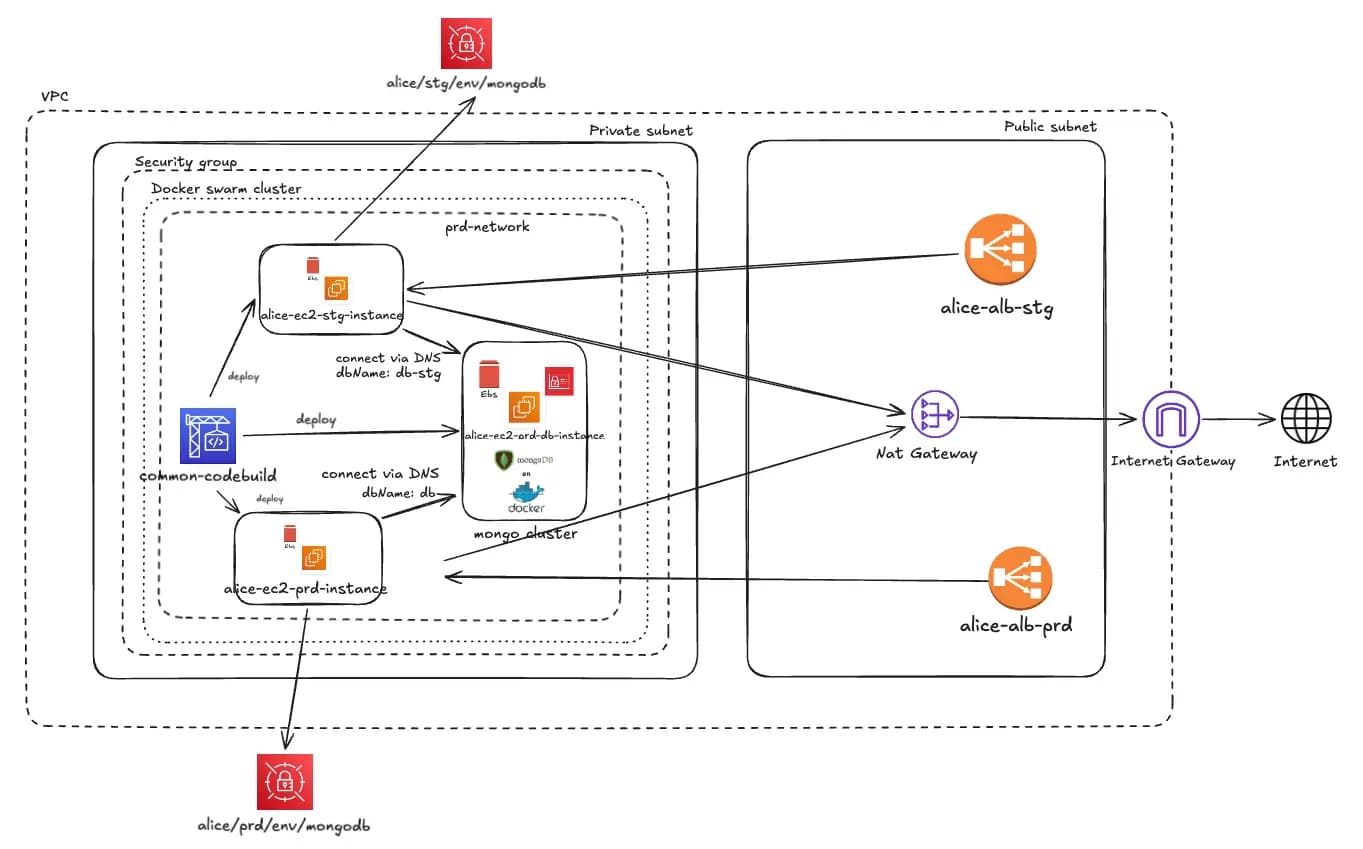
The AWS layout (what runs where)
Inside one VPC, I used a simple split:
Public subnet
- ALB (staging)
- ALB (production)
- NAT Gateway
- Internet Gateway
Private subnet
- Docker Swarm cluster (2 nodes: 1 manager + 1 worker)
- Application services (staging/prod stacks)
Key point: the Swarm nodes are not public.
Why public ALB + private compute is my default pattern
For inbound traffic:
Internet → ALB (TLS termination) → private Swarm services
This works well because:
- Only the ALB is exposed publicly
- TLS and domain config live in one place
- The cluster stays isolated inside the private subnet
- You can scale services without changing public endpoints
Why NAT Gateway exists here
Even if the cluster is private, services still need outbound access (for APIs and integrations).
Outbound flow:
Private subnet → NAT Gateway → Internet Gateway → Internet
So the servers stay private, but the app can still reach external services safely.
CI/CD: CodeBuild → ECR → Swarm deploy
To avoid manual deploys, I used:
- AWS CodeBuild for builds
- ECR for storing versioned images
- A deploy step that updates Swarm services to a new image tag
Typical release flow:
- Push code
- CodeBuild builds Docker images
- Push images to ECR
- Update Swarm services (rolling update)
This gives:
- consistent releases
- easy rollback (redeploy an older image tag)
- fewer “works on my machine” problems
Keeping staging and production separated
I separated environments using:
- Separate ALBs for staging vs production
- Separate stacks / networks inside Swarm
Result:
- staging can move fast
- production stays stable
What I like most about this design
This system is not “the most complex”. It is:
- secure by default (private compute, controlled ingress)
- easy to reason about
- fast to deploy
- practical for a small team
It gave ALICE a stable base to grow features without turning infra into a full-time job.
Closing
ALICE needs to feel like a reliable teammate. That starts with infra that is stable and simple:
- Docker Swarm (2 nodes: manager/worker)
- ALB for domains + TLS
- Private subnet for compute
- NAT for outbound
- CodeBuild + ECR for repeatable releases
Try ALICE now: https://app.heyalice.net/
Contact us at: contact@atware.asia